Article实现一缩略标题概述多行标题列表
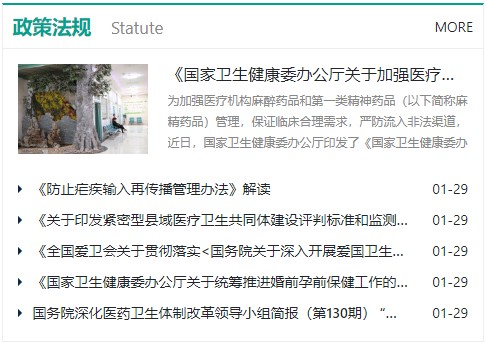
DEMO:hosp
HTML:实际使用时,请将-改成_,其中para在模板管理里设计,在菜单管理定位,summ=3显示如图设计(非ipk),rows=6显示列表行数,MORE显示更多链接,支持1,2,3等数字在菜单管理自定义
$func-article(navi=bd,para=Statute,title=10,summ=3,rows=6,more=MORE)$CSS:
#ArticleList {
  ul li {
    margin-bottom: 0;

    &.Summary {
      display: flex;
      flex: 1;
      margin-bottom: 14px;

      .thumbs {
        display: flex;
        flex-shrink: 0;
        height: 120px;
        margin-bottom: 20px;
        overflow: hidden;

        a {
          display: flex;
          width: 100%;
          height: 100%;
          align-items: center;
          overflow: hidden;

          img {
            width: 100%;
          }
        }
      }

      .detail {
        .intro {
          height: 60px;
          overflow: hidden;
          color: $dark;
          font-size: 12px;
          line-height: 1.8em;
        }
      }
    }

    h6 {

      a {
        display: block;
        overflow: hidden;
        white-space: nowrap;
        text-overflow: ellipsis;
      }
    }


    .Article {
      display: flex;
      flex-flow: row nowrap;

      top {
        overflow: hidden;
      }

      h6 {
        width: calc(100% - 60px);

        a {
          display: block;
          overflow: hidden;
          white-space: nowrap;
          text-overflow: ellipsis;
        }
      }
    }
  }
}

@media (min-width: 568px) {
  #ArticleList {
    ul li {
      &.Summary {
        flex-direction: row;

        .thumbs {
          width: 150px;
          height: 90px;
          padding-right: 20px;
          margin-bottom: 0;
        }

        .detail {
          width: calc(100% - 150px);
        }
      }
    }
  }
}
本站及内容可以下载,代码只需复制粘贴入模板即可使用,如您发现代码错误或者需要对弘帝建站系统进行深入学习,请联系微信:hondyzhang,或者QQ:7833865。